With a new brand name comes a new introduction video! I have been looking all over the internet and compared many different video making and editing applications, both online as desktop-based. I was trying to find one that could match the idea I envisioned in my head. After trying out tens of different options, I was beginning to lose hope. But finally, I found what I was looking for : Renderforest.
Key features that I find important are ease-of-use, beautiful and easy to customize templates, and in the case of an online platform; stability and processing speed. What I like about Renderforest is that it allows anyone to create amazing trailers and videos without needing technical skills. Furthermore it is very Youtube compatible!
The software offers you free video production services online. The free tools let you create professional quality presentations, intros, slideshows and much more. The software is particularly useful in making explainer video production for start-ups and small businesses who cannot afford to have an IT team.
Key features that convinced me
On the first look, Renderforest seems to be a quite feature rich video maker. The video making interface offers some great tools that you can use. Here is a full list of features:
Stability & Performance
While we were working with Renderforest, one thing that really impressed me was the stability of the web application and the speed with which our created videos were rendered.
Templates
As a novice video maker, your first concern must be creating a layout for your video. Renderforest offers the best solutions for that. The software provides some templates in various categories; such as Logo Reveal, Flipping Slideshow, Promotion, Company Introduction, Story Promotion, App Promotion, Music Visualizer, Animated video clips, etc. In short, you will find a predesigned template for almost every requirement of yours.
While the templates offer great variety regarding purpose, you’ll get many great options regarding typography too. Some of the attractive typography templates are Brush Typography, Wrap Typography, etc.
While you get a lot of choices for professional video, there are some awesome templates for personal videos such as Valentine Day’s video care, Wedding Videos too. And the greatest thing is Renderforest keeps adding new templates to its already superb collections.
Compatibility
Another very important feature that drew our attention is compatibility. The videos rendered through this software are fully compatible with desktop, laptop, tablets and smartphones. So, no matter where your viewer is watching it, he/she will get the best viewing experience.
This indeed is a very useful feature, especially if you want to send out your videos to a larger audience. This way you can ensure that your message will reach your viewers no matter what device they are using.
Editing Interface
Renderforest is probably the easiest video maker software out there. The editing interface is a breeze to use. You can change almost every aspect of your chosen template to customize it. Starting from pictures and text till color scheme, you can customize them all according to your preference without any IT help.
The editing tools let you add music or voice-overs to make your video look more presentable. We found the voice-over feature quite crucial for explainer video production.
Self-Explanatory & Ease of Use
We registered to Renderforest to access the user-friendliness of the software. The registration process is pretty simple. You can register with only basic information such as your name and e-mail address.
There is no need to provide any card details to register to the website. Once you register, you can immediately start creating your video in an easy 3 step process.
Step 1: The first move is to select a template for your video. Browse through the array of excellent templates and choose one according to your requirement. Once chosen select the same, and you’ll reach the editing interface.
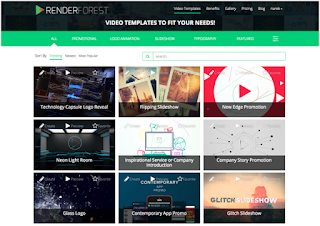
Step 2: Now upload your photographs that you want to include in your video. You can use the editing tools here and add texts, change colors, add voice-over, etc.
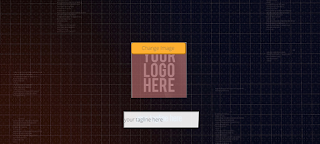
The editing tools are pretty simple to use and being completely novice in video making we found it pretty smooth.

Step 3: Once you are satisfied with the sequence of the pictures, music, and texts, just render your video. With the one click, you’ll get your professionally designed high-quality video that you can use for business presentations, e-mail marketing or personal purpose.
Plans & Pricing
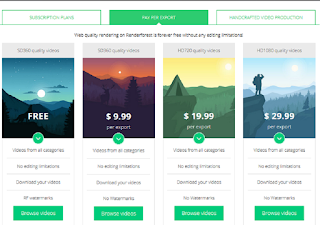
There are three types of pricing plans available for Renderforest. For complete details of pricing navigate here.
1. Subscription Plans
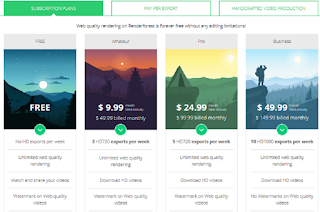
2. Pay Per Export
3. Handcrafted Video Production
This package exclusively offers Explainer video production services to businesses. The price is customized as per the requirement of the industries concerned.
As you can see in the first two pricing categories, the basic plan is entirely free of cost. While this basic plan is quite enough for personal usages and small businesses, videos bear the Renderforest watermark on all free packages. If the watermark does not bother you much, then you can use the free package as long as you want. Although for advanced services and features, going for a higher package is no doubt recommended.
Sign Up Now
Conclusion
After reviewing all the features and aspects of the software, PepTheWorld strongly recommend Renderforest for professional and personal use. The reasons are as follows:
- Great easy to use.
- An amazing array of templates.
- Easy free registration.
- Economical & Flexible pricing options.
- Unlimited free usage.
- Fast & Professional support service
Renderforest is truly the best free video making software available today. Give it a try and I’ll look forward to see your newly Rendered movies!
 PepTheWorld